Know if a job is real before you send anything.
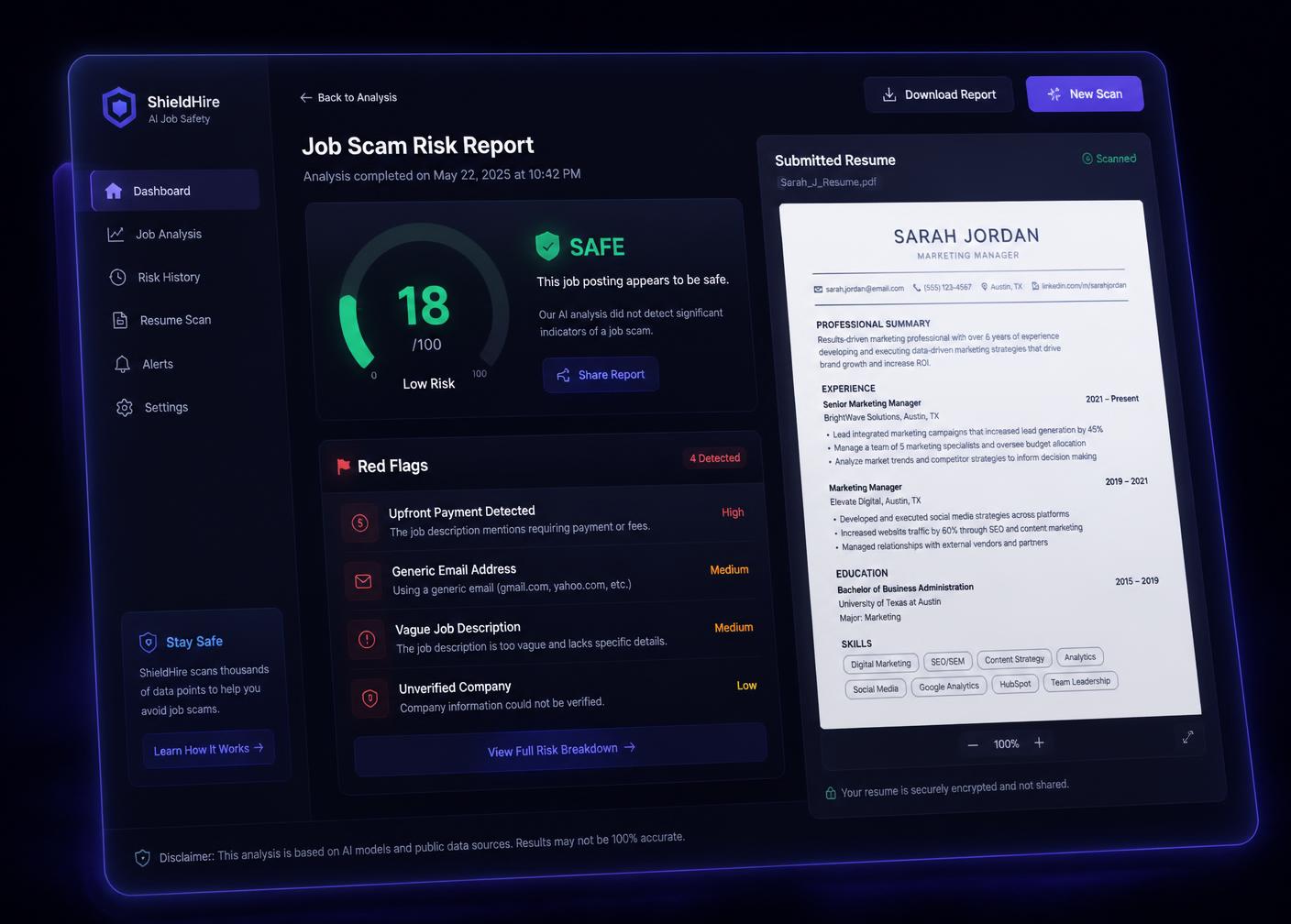
Nitshield reads the posting you paste in — payment asks, contact details, company information, pressure language — and hands you a clear risk report in seconds. Then it helps you build the resume that wins the real ones.
15
documented fraud checks run on every scan
Seconds
from pasting a posting to a full risk report
5
free tools in one job-search workspace
0
resumes sold, shared or resold. Ever.
Five tools, one job search
Everything a job seeker actually needs between finding a posting and hitting send.
Job Scam Scanner
Paste the job text and get a 0–100 risk score with plain-English reasoning for every flag.
Scan a postingResume Builder
Ten parse-safe templates, guided section prompts and phrasing tips that keep your own voice.
Build my resumeATS Checker
Upload your resume against a job ad and see keyword coverage, parse errors and formatting blockers.
Check my scoreCover Letter Generator
Six prompts, four tones, a live preview. Get a tailored one-page letter you can copy or download instantly.
Write my letterInterview Preparation
A question bank by track, a STAR answer builder and a response timer so you rehearse before it counts.
Start practisingThe patterns behind almost every job scam
Fake postings rarely look obviously fake. They look ordinary — until the fourth message, when the ask arrives. Nitshield grades the whole posting against the signals that repeat across widely reported scam cases, and shows you the evidence rather than a mysterious verdict.
See a sample reportUpfront payment asks
Training kits, background-check fees, equipment deposits — real employers never invoice a candidate.
Throwaway contact details
Free mail domains, Telegram-only interviews and mismatched recruiter names get called out instantly.
Unverifiable companies
Missing company details, no verifiable name or contact and vague employer information in the posting are flagged for you to verify.
Too-good-to-be-true pay
Pay figures that look implausible for the role and hours described in the posting itself are flagged.
How a scan works
No account, no upload of personal documents, no waiting room.
Paste the posting
Copy the job text from a job board, WhatsApp or email and paste it in.
Checks the job against 15 documented fraud checks.
Language patterns, payment demands, contact details and company information in the posting are scored together.
Read the report
Every flag is explained in one sentence, with a recommended next step you can act on today.
Apply with confidence
Safe posting? Tailor your resume to it in the builder and check ATS coverage before you send.
When to run a check
Before you reply to a recruiter
Paste the message or posting and read the flags first, so you know what to verify before sharing documents.
Before you pay for anything
Any request for a training kit, deposit or background-check fee is called out explicitly, with the reason.
Before you hit send
Tailor your resume to the posting in the builder, then check keyword coverage and parse errors in the ATS checker.
Frequently asked
What exactly does Nitshield do?+
Nitshield is one workspace for a safer job hunt: scan a posting for fraud signals, build an ATS-ready resume, check that resume against the ad, write a tailored cover letter and rehearse the interview.
How do I sign in?+
Sign up with your email and a password. Logging in uses the same email and password, so your saved resumes, scans and drafts stay tied to your account.
Is Nitshield free?+
Yes. Scam scanning, the ATS score and the cover letter generator are completely free and unlimited — no usage caps or monthly allowance.
What does the risk score actually measure?+
Fifteen documented fraud patterns — upfront payment asks, throwaway contact details, unverifiable employers, pay that looks implausible for the described role and pressure language. Every flag is explained in one line.
A posting came back high risk. What now?+
Stop sharing documents, never pay for training or equipment, and verify the recruiter through the company's official careers page or switchboard. Then report the post to the job board using the flags listed.
Why don't my resume templates look right elsewhere?+
Every Nitshield template is single-column under the hood with standard section names and selectable text, so what you see in the gallery is exactly what a parser and a recruiter get in the exported PDF.
Can I start from the resume I already have?+
Yes. Upload a PDF, DOCX or TXT and Nitshield pulls your name, contact details, skills and achievements into the builder and the cover letter form automatically.
How many templates are there?+
Ten resume templates and twenty cover letter designs. Switching a template changes structure, name treatment and accent colour — not just the typeface.
Where does my data live?+
On your device. Resumes, scan history and your account stay in this browser, are never sold or shared, and can be deleted from your profile at any time.
How do I reach the Nitshield team?+
Email nitshield@gmail.com or use the contact page, and we will get back to you as soon as we can.
Check the posting before it checks you
One paste, one clear report — and you can send it to the friend who forwarded you the offer.
Start a free scan